How to Book Dream Flights with AwardTool's First Class Explorers
Last modified on
Scoring a first-class award ticket on world-renowned airlines like ANA, Emirates, or Cathay Pacific can often feel like finding a needle in a haystack. Because these premium cabins are incredibly hard to find, AwardTool has simplified the process by actively seeking out and storing these rare deals in a dedicated space.
With the First Class Explorers feature, finding the most luxurious flights in the sky is now effortless. Here is a step-by-step tutorial on how to use it.
Step 1: Access the First Class Explorers
We know that travelers usually have specific bucket-list experiences in mind. Instead of making you sift through thousands of economy and business class tickets, we store hard-to-find first-class deals entirely separately.
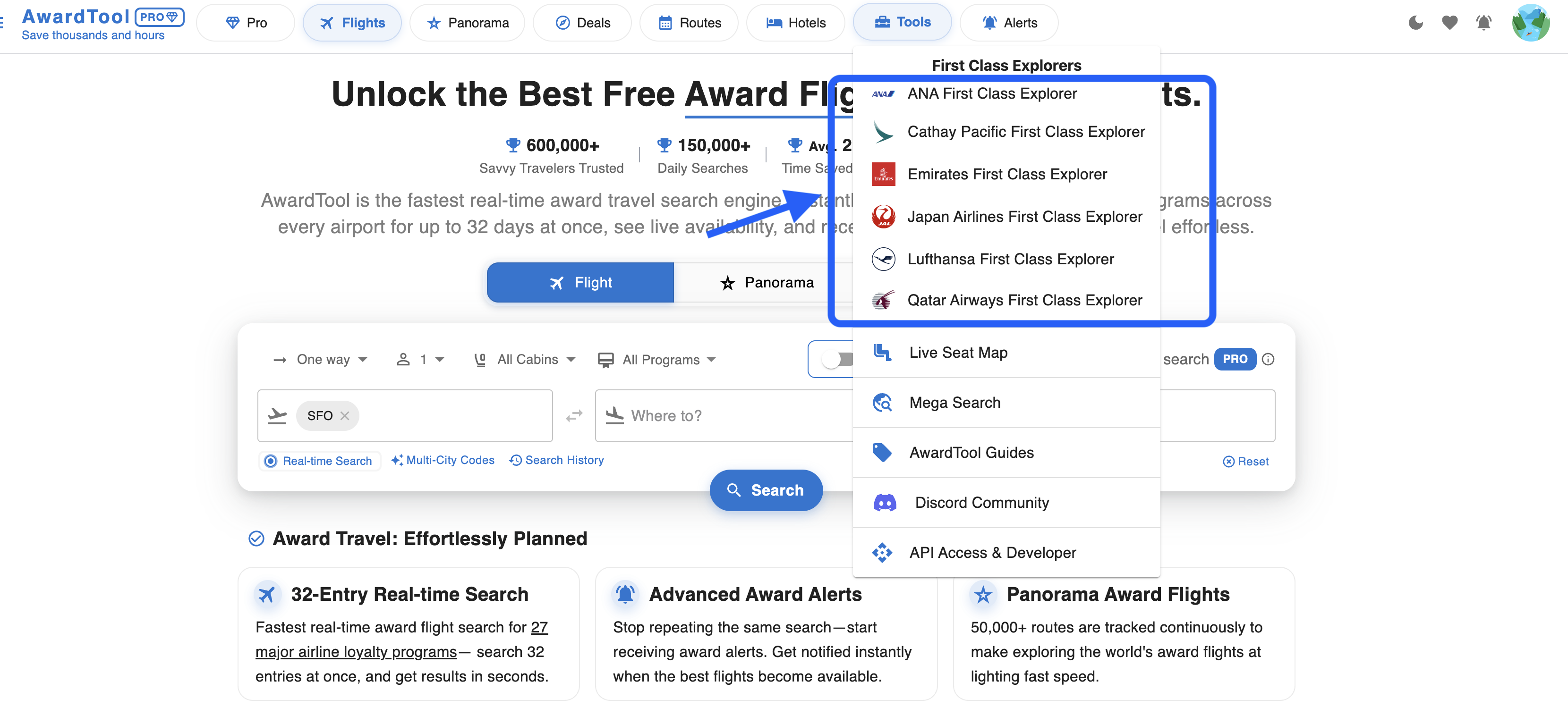
- Navigate to the top menu bar and click on the Tools dropdown.
- Look for the First Class Explorers section.
- Select the specific airline experience you want to search for (e.g., ANA First Class Explorer, Emirates First Class Explorer, Cathay Pacific First Class Explorer).
Clicking on your desired airline will immediately direct you to a specialized flight details page populated entirely with first-class availability for that carrier.
Step 2: Set Your Search Parameters
Once you are on the First Class Explorer page, you have immense flexibility to tailor the search to your travel goals.
- Flexible Locations: In the “From” and “To” search bars, you aren't limited to just specific airport codes. You can search by continents, countries, regions, airports, or simply leave it as “Anywhere” to see every possible route available globally.
- Broad Date Ranges: You can search a massive window of time to maximize your chances of finding a seat. Select your date range to view a maximum of 90 days of data at once.
Pro Tip: Leaving your destination as “Anywhere” with a broad 90-day search is the best way to let the tool find the absolute best first-class availability for you.
Step 3: Narrow Down with Advanced Filters
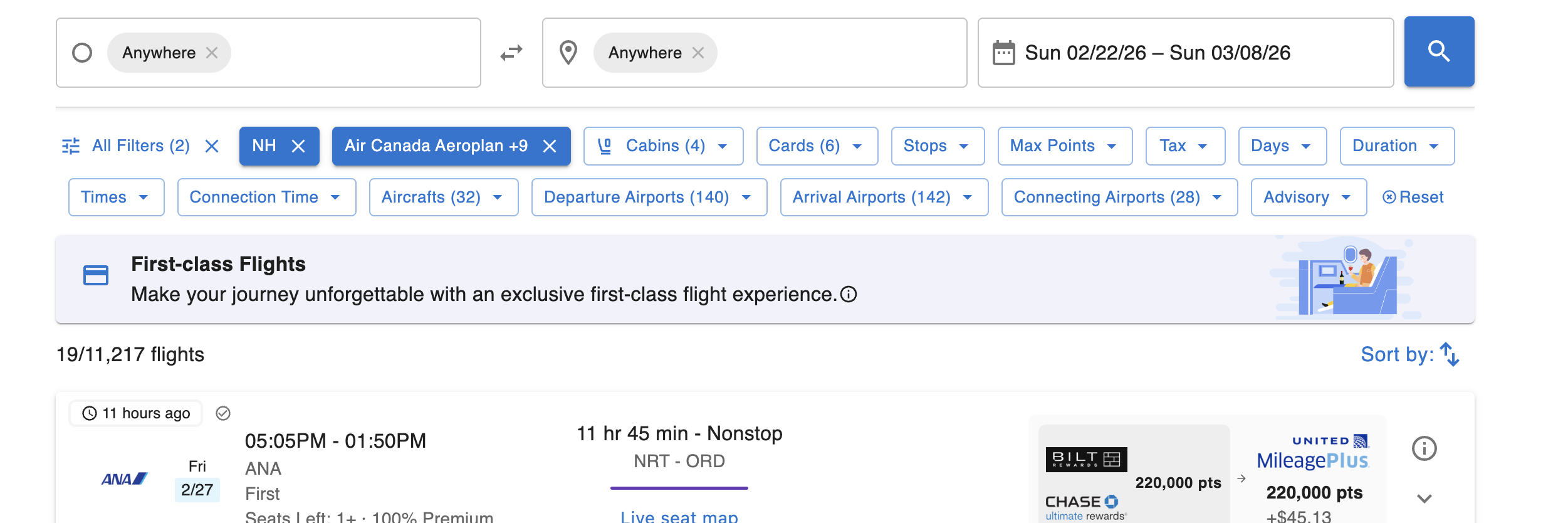
Even when looking at exclusive first-class deals, you might want to dial in your preferences regarding points and routing. AwardTool offers a robust filter bar at the top of the search results to help you narrow down the flights you're most interested in.
You can filter by a comprehensive set of parameters:
- Airlines & Loyalty Programs: Specify exact airline codes (e.g., NH for ANA) or select the specific miles you want to use (e.g., Air Canada Aeroplan).
- Cabins: Adjust your cabin class preferences if you want to explore other premium options.
- Cards: Only show flights bookable with the credit card points you actually have.
- Stops: Choose your preference for non-stop flights or a specific number of layovers.
- Pricing Constraints: Set a ceiling using the Max Points and Tax filters to ensure options fit your budget.
- Timing & Duration: Fine-tune your itinerary using the Days of the week, total Duration, departure/arrival Times, and specific Connection Time limits.
- Aircraft: Prefer a specific plane model? Filter by aircraft type to ensure the exact experience you want.
- Airports: Get highly specific with your routing by defining exact Departure Airports, Arrival Airports, and even Connecting Airports.
- Flight Quality: Filter itineraries by layovers, airport changes, overnight flights, and tight connections.
Note: You can easily clear all your parameters at any time by clicking the Reset button on the right side of the filter bar.
Step 4: Review Flight Options
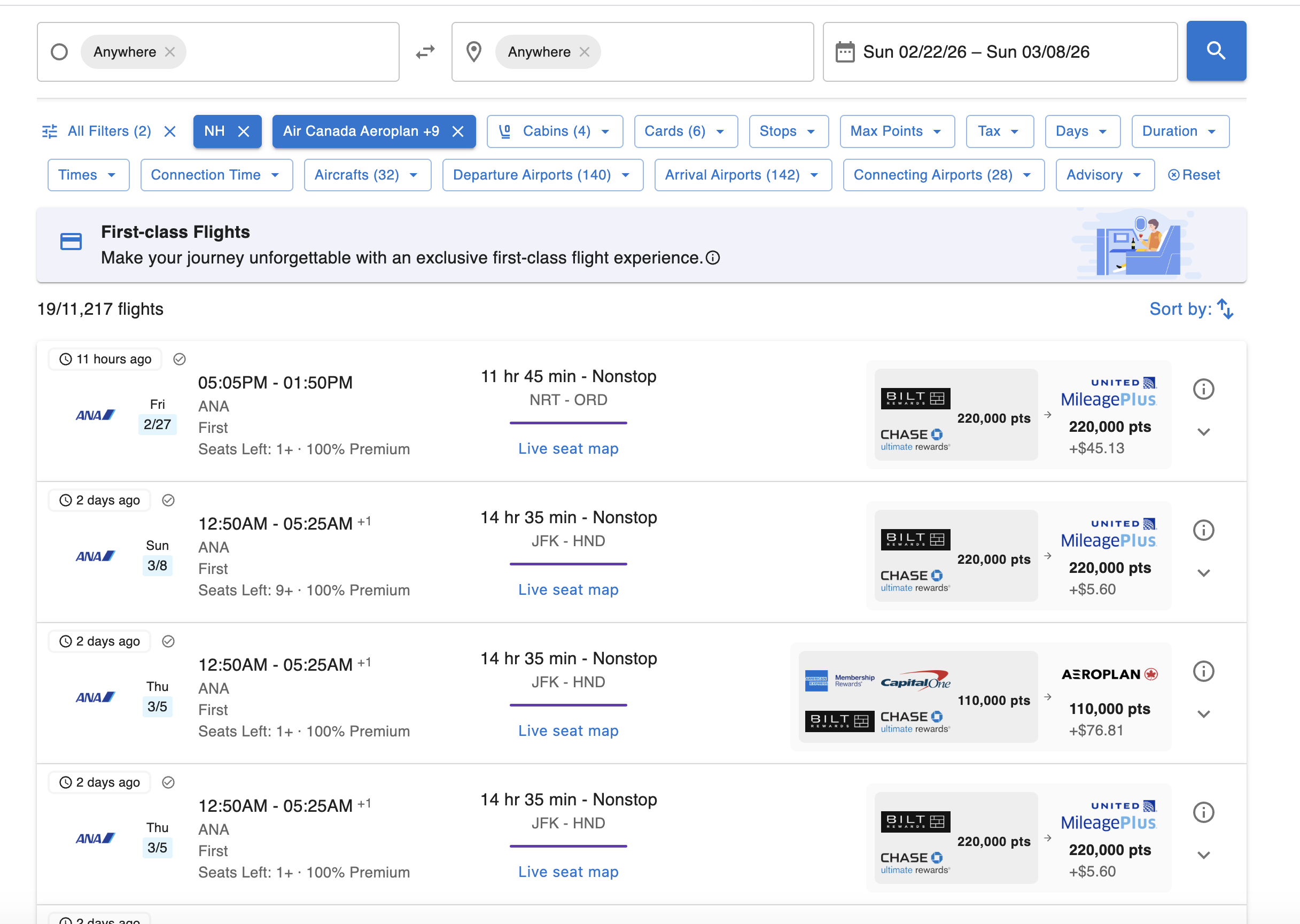
As you adjust your filters, the results will update to show you the exact itineraries that match your criteria.
Each result card gives you a comprehensive overview:
- Flight Itinerary: Departure and arrival times, routing (e.g., JFK – HND), and total travel duration.
- Seat Availability: See exactly how many first-class seats are left, along with a “Live seat map” link to check cabin layout.
- Pricing & Partners: The right side of the card clearly displays the required points, the out-of-pocket taxes, the specific loyalty program you need to book through, and the credit card currencies that transfer to that program.
Step 5: Click for Booking Instructions
Once you spot your dream flight, AwardTool eliminates any guesswork on how to actually secure the ticket.
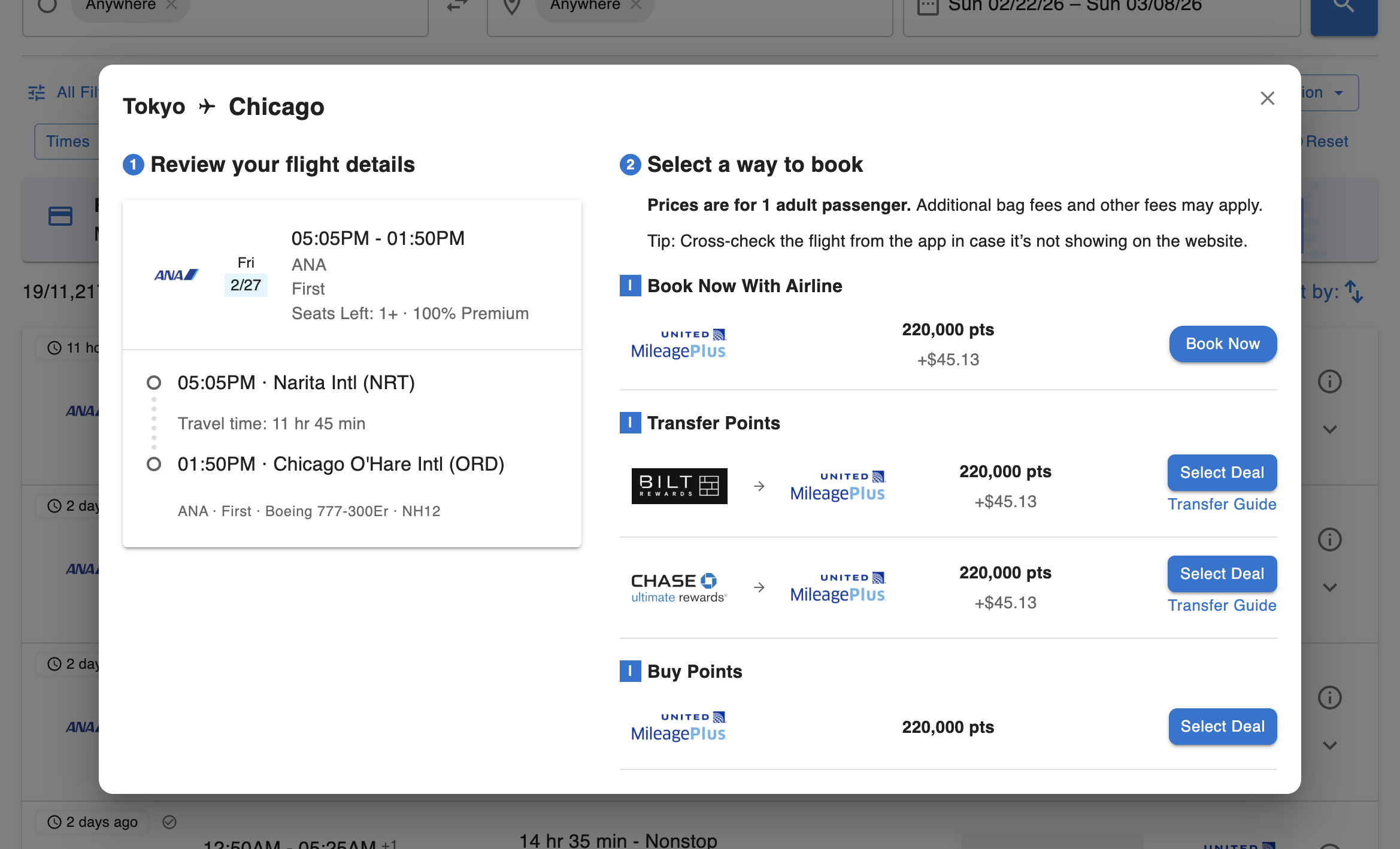
Simply click the Information button (the “i” icon) on the right side of the flight card. This will open a detailed pop-up window tailored to that specific flight:
- Review your flight details: Double-check the exact airports, travel time, and specific aircraft model (e.g., Boeing 777-300ER).
- Select a way to book: We provide you with the exact paths to get your ticket:
- Book Now With Airline: If you already have the required airline miles, click here to be taken straight to the booking page.
- Transfer Points: This section shows you exactly which credit card rewards (like Chase Ultimate Rewards or Bilt Rewards) you can use. Click “Select Deal” to proceed, or click our included Transfer Guide if you need step-by-step help moving your points to the airline.
- Buy Points: Short on miles? We will also show you the option to purchase the necessary points directly through the loyalty program to cover the difference.
With AwardTool's First Class Explorers, finding and booking the holy grail of award travel takes seconds instead of hours. Select your airline, cast a wide net with your dates and locations, set your filters, and get ready to pack your bags!
Need Help?
Contact support at team@awardtool.com