Mastering AwardTool Panorama: Unlock the World's Best Flight Deals
Last modified on
Finding the perfect award flight can feel like searching for a needle in a haystack. With Panorama, you gain full, unrestricted access to the AwardTool database—leveraging millions of daily searches and over 40,000 continuously tracked routes.
Instead of searching day-by-day or airport-by-airport, Panorama lets you search entire continents in seconds. Here is your step-by-step guide to using Panorama to book your next dream vacation.
Step 1: Access the Panorama Feature
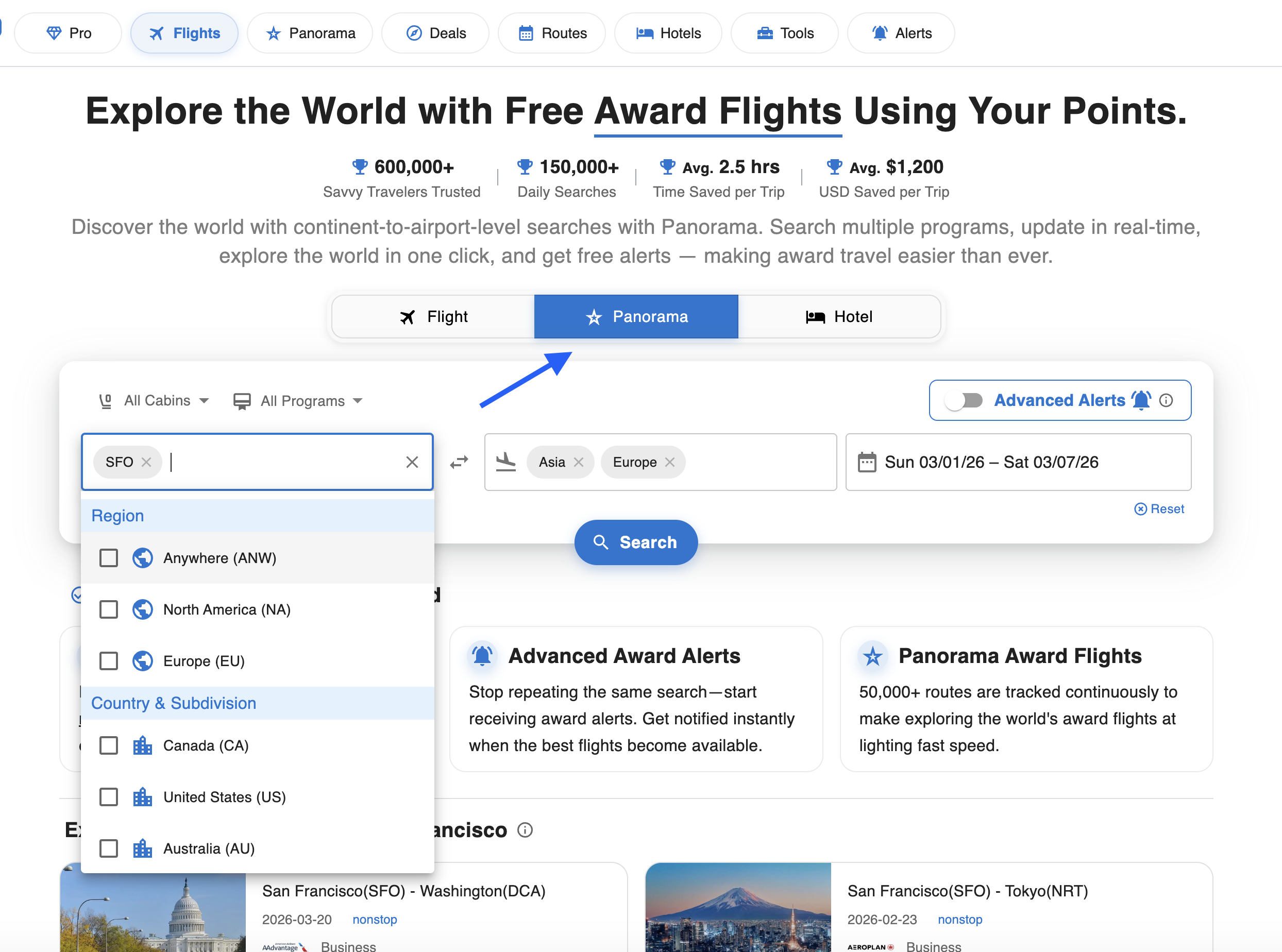
Getting started is easy. You can access Panorama directly from the top navigation bar by clicking on the Panorama tab, or you can switch to the Panorama option right above the main search box on the homepage.
Tip: Look for the star icon next to “Panorama” to know you are in the right place!
Step 2: Search Across Regions, Countries, and Continents
This is where the magic happens. Traditional search engines force you to input a specific destination airport. With Panorama, your search can be as broad or as specific as you like.
Click on the destination box to search by:
- Continent (e.g., Europe, Asia, North America)
- Region (e.g., Anywhere)
- Country
- Specific Airports (e.g., SFO, LHR)
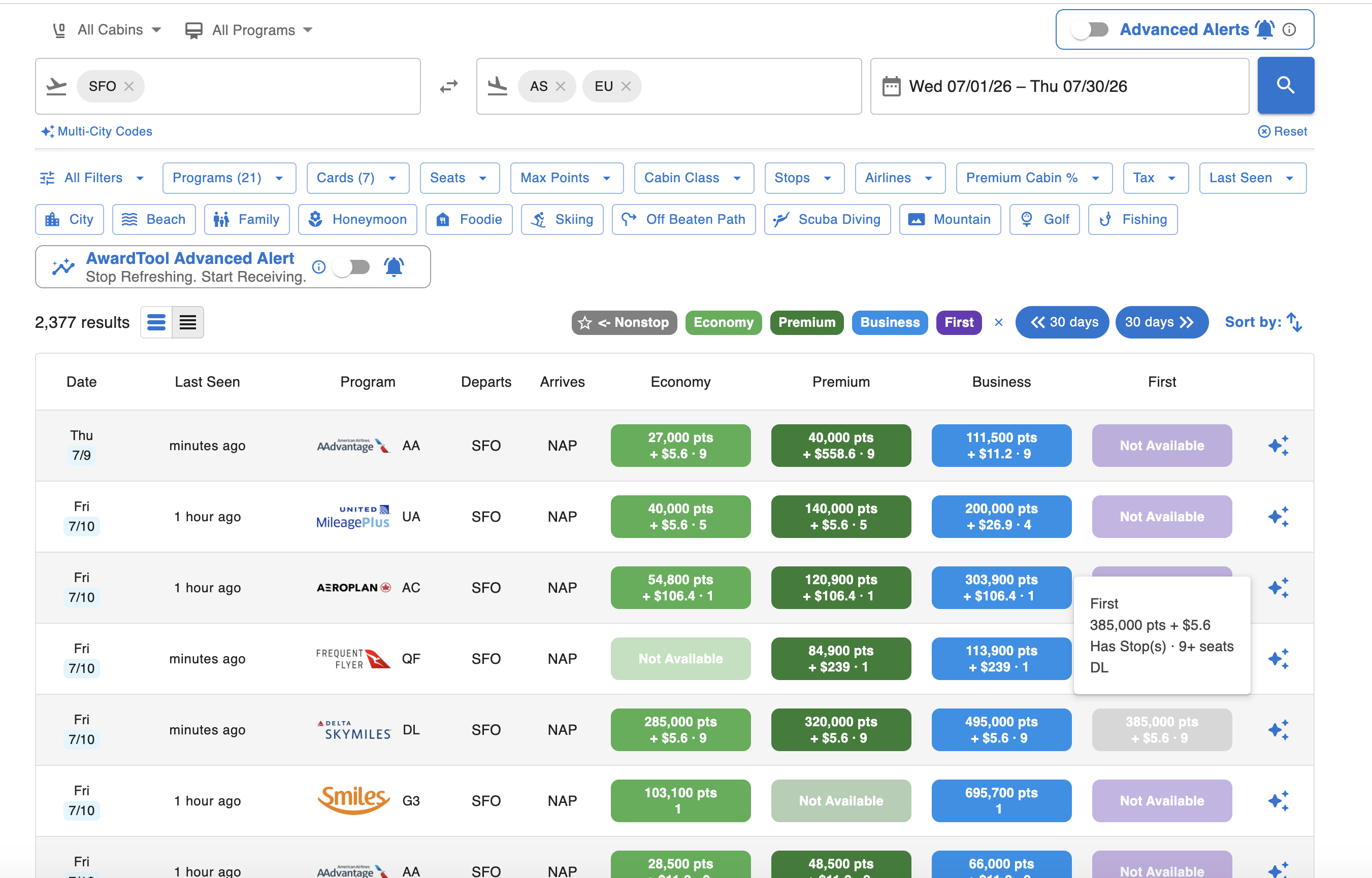
Input your origin, select your broad destination, pick your date range, and hit Search. You can search up to a 90-day range in one shot—no need to repeat the same search day by day. Thanks to our cached database, your results will load within seconds, giving you a bird's-eye view of all available flights across your entire travel window.
Step 3: Up-to-the-Second Live Auto-Refresh
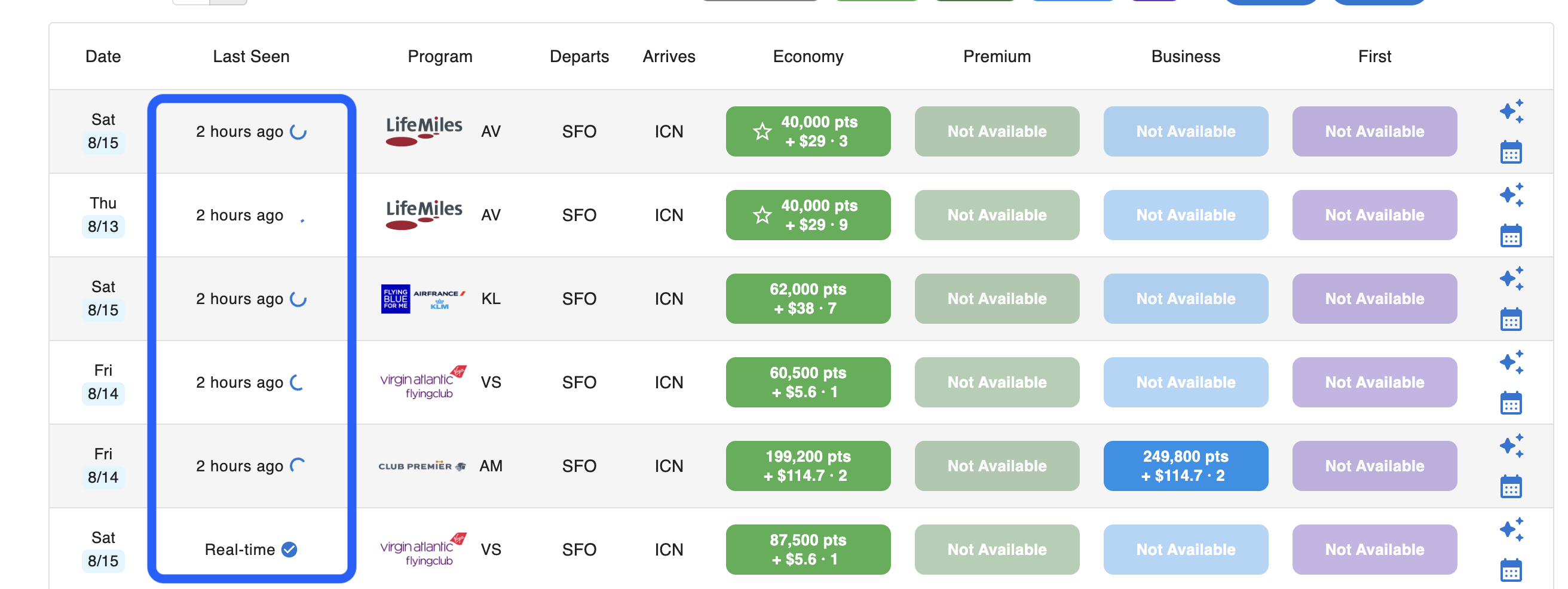
Award availability changes constantly. There is nothing worse than finding a great flight only to realize it's already gone.
As you search, the Panorama results are refreshed automatically in the background to check for up-to-the-second availability. Furthermore, when you click into the specific flight details, Panorama triggers a live background refresh with the airline. Look for the “Refreshing data with airline...” indicator at the top right of the details screen. This guarantees that the availability and pricing you are looking at are accurate and bookable right now.
Step 4: Filter for Your Perfect Itinerary
Once your results load, you'll likely see thousands of options. Use our powerful filtering system to narrow down the deals to exactly what fits your travel needs.
At the top of the results page, use the dropdown menus to zero in on the perfect flight. Here is what each filter does:
- Programs: Select the specific frequent flyer programs you want to book through (e.g., AAdvantage, Aeroplan, MileagePlus).
- Cards (Transfer Partners): Only show flights you can book using the credit card points you already have (e.g., Chase Ultimate Rewards, Amex Membership Rewards, Capital One, or Citi).
- Seats: Filter by the minimum number of award seats available—perfect for ensuring your whole family can fly together.
- Max Points: Set a ceiling on the absolute maximum number of points or miles you are willing to spend for the ticket.
- Cabin Class: Narrow your search strictly to Economy, Premium Economy, Business, or First Class.
- Stops: Prefer a direct route? Filter for Nonstop flights only, or set a maximum number of connections.
- Airlines: Include or exclude specific operating airlines based on your preferences.
- Premium Cabin %: For mixed-cabin itineraries (where one leg is in Business and a connecting leg is in Economy), ensure a certain percentage of your total journey is actually in the premium cabin you are paying for.
- Tax: Set a cap on out-of-pocket cash surcharges and taxes so you don't get hit with unexpected fees.
- Last Seen: Filter results based on how recently our system verified the availability (e.g., within the last few minutes or hours).

Step 5: Dive Into the Flight Details
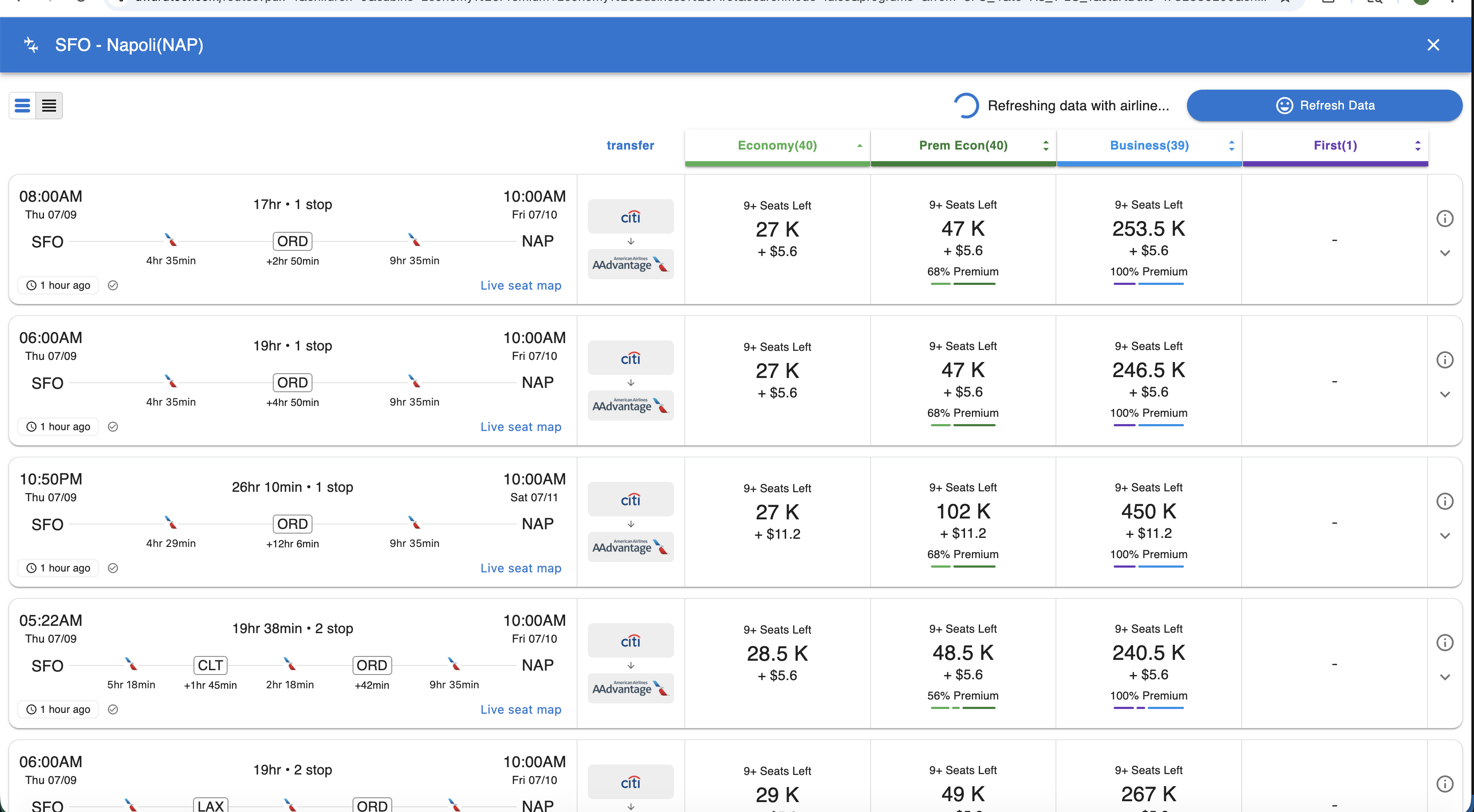
Found a deal that catches your eye? Simply click on the specific flight block in the search results to open the detailed flight view.
Here, you get a comprehensive breakdown of the itinerary. You will be able to see:
- Exact departure and arrival times.
- Layover durations and connection airports (e.g., via ORD or CLT).
- Live seat maps (when available).
- Transfer Paths: We show you exactly which credit card points (like Citi, Chase, or Amex) transfer to the airline program so you know exactly how to book.
Step 6: Set Up Panorama Alerts for Ongoing Monitoring
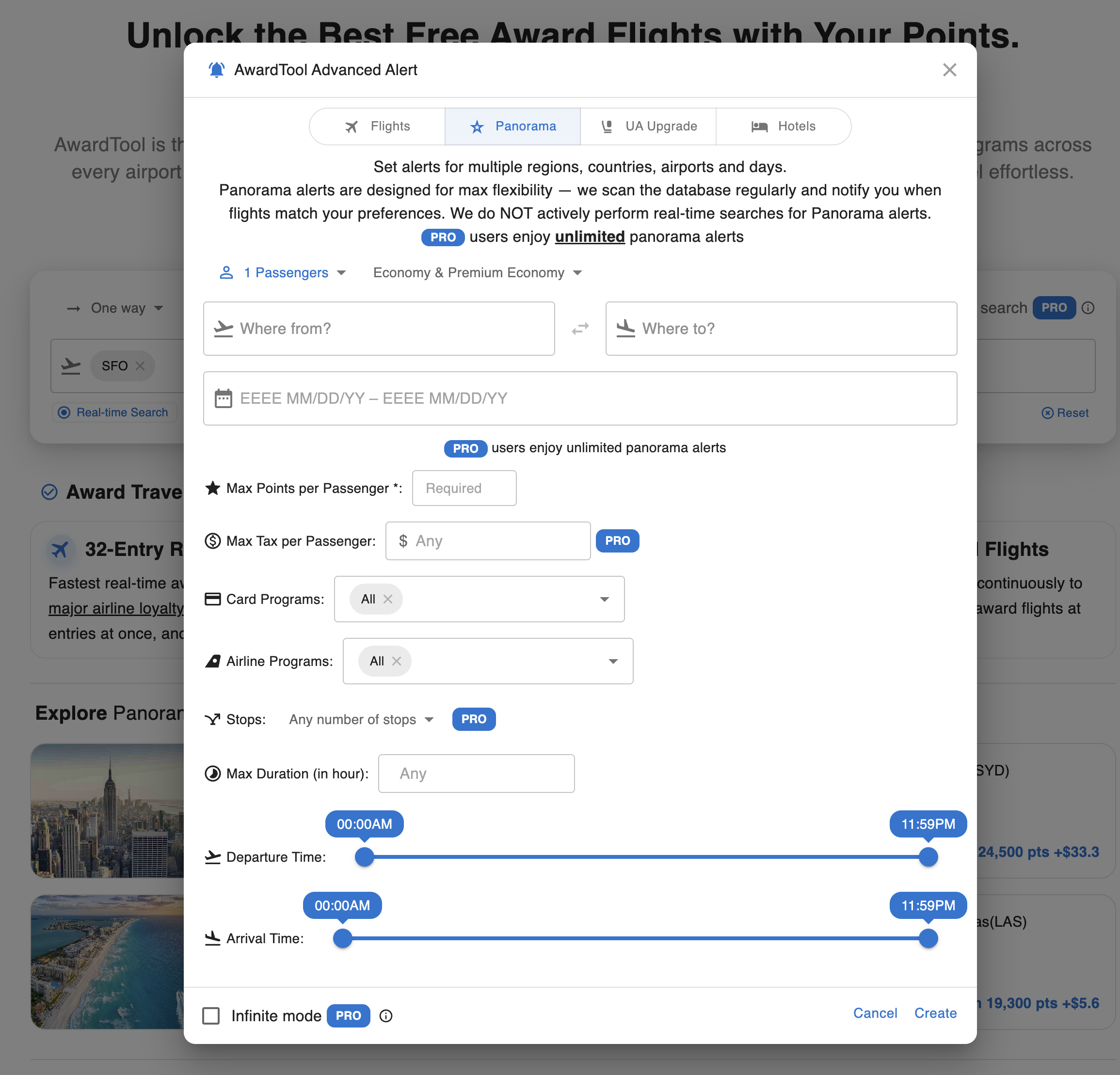
If you are not ready to book immediately, set up a Panorama Alert so AwardTool can keep searching for you in the background.
Click the Panorama Alert button, or click any alert button and switch to the Panorama tab, and define your criteria such as origin, destination, date range, cabin, points, taxes, stops, and preferred programs.
- Always-on matching: We continuously check our database against your saved Panorama alert criteria to find the best matches as availability changes.
- Flexible criteria: You can make alerts broad (for discovery) or highly specific (for exact routes, cabins, and budgets).
- Fast notifications: When a match is found, we notify you so you can review and book quickly.
Pro Tip: Infinite mode is a PRO feature. If the alert has Infinite mode turned on, the alert will not be turned off when there is an update. PRO users will keep getting updates all the time. Never miss a deal!
With AwardTool Panorama, you gain ultimate flexibility, breaking free from rigid, single-airport searches. Whether targeting a specific city or exploring an entire continent, Panorama adapts to your travel style. Let our system do the heavy lifting and enjoy the freedom to plan your perfect trip.
Need Help?
Contact support at team@awardtool.com